
Plan from recipes you trust
Bring your own recipes. Plan the week. Shop one list.
You should not have to abandon the recipes your household already knows just to use a meal-planning app. Add your recipes to Pantry Aide, keep useful community recipes in your saved collection, review the week it proposes, and turn the recipes you approve into one grocery list.
Updated October 8, 2026
Your recipe collection should lead to a finished week
Saving recipes and planning dinners are often treated as separate jobs. One app holds bookmarks, another holds the calendar, and the grocery list starts again in a note. Pantry Aide keeps the recipe collection connected to the weekly plan and the ingredients you decide to buy.
The point is not to collect the largest possible recipe library. It is to keep recipes you can inspect, choose a realistic week from that collection, and carry the approved meals into shopping without recopying every ingredient.
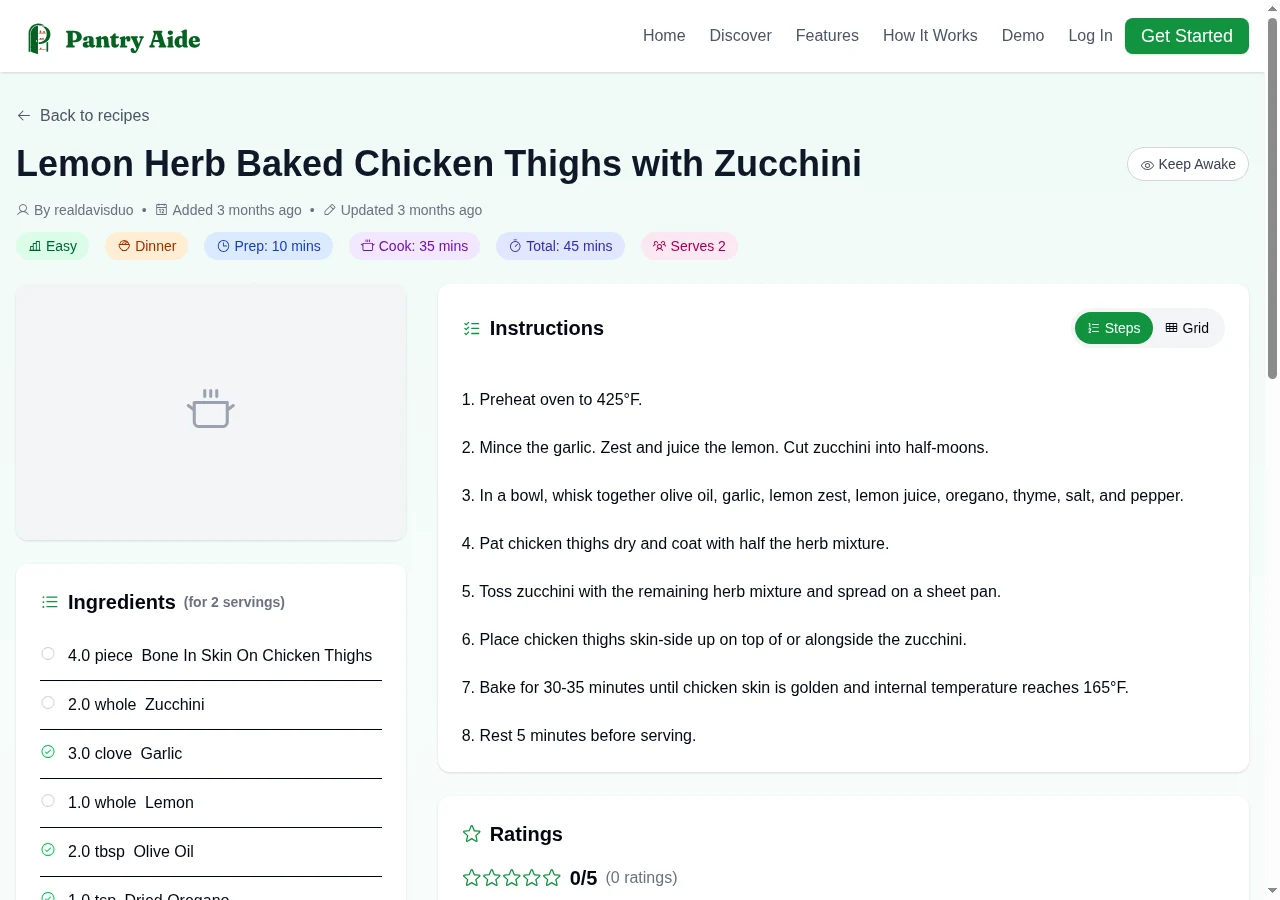
Add the recipes you already use
You can enter a recipe manually or import a supported recipe page by URL, then review the title, yield, ingredients, quantities, and instructions in Pantry Aide. Subscribers can also use photo recipe extraction and review the extracted result.
You can save useful public Pantry Aide recipes alongside recipes you entered yourself. Only recipes you own or explicitly save belong to your available collection; browsing a public recipe does not automatically add it.
- ✓Enter a family recipe manually when there is no source page.
- ✓Import a supported recipe URL instead of copying each field by hand.
- ✓Review imported ingredients, quantities, yield, and instructions before planning.
- ✓Save a public recipe only when you want it available for future plans.
- ✓Use tags and ratings to make the collection easier to review over time.
Build a candidate plan from the available collection
When Pantry Aide generates a standard meal plan, it receives the dinner recipes available to you along with recipe details such as ingredients, cooking time, difficulty, tags, and ratings. Your own ratings carry more weight than community averages, but ratings remain guidance rather than a rigid rule.
Describe how many dinners you need and add the constraints that matter this week. Then inspect the proposed recipes. “Uses my recipes” should mean that your collection is part of the planning input—not that every generated choice is automatically correct or that the app promises to choose only recipes you personally wrote.
Review the meals before buying their ingredients
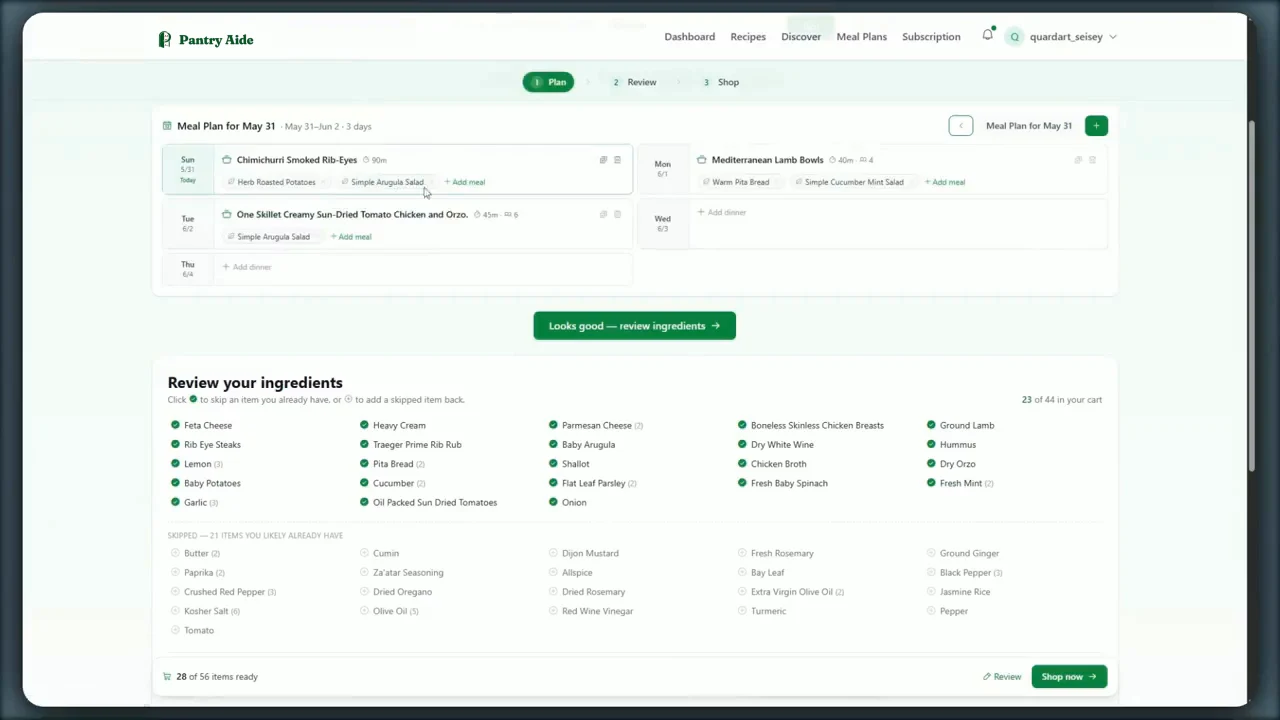
Open the recipes and make sure the week fits the actual schedule, preferences, and people you are feeding. Replace, move, add, or remove a meal before treating the plan as approved.
This review is especially important after importing a recipe. Pantry Aide stores the recipe details you approve, but source pages and automated extraction can still need human correction. The shopping list can only be as useful as the recorded ingredients and quantities behind it.
Turn the approved recipes into one grocery list
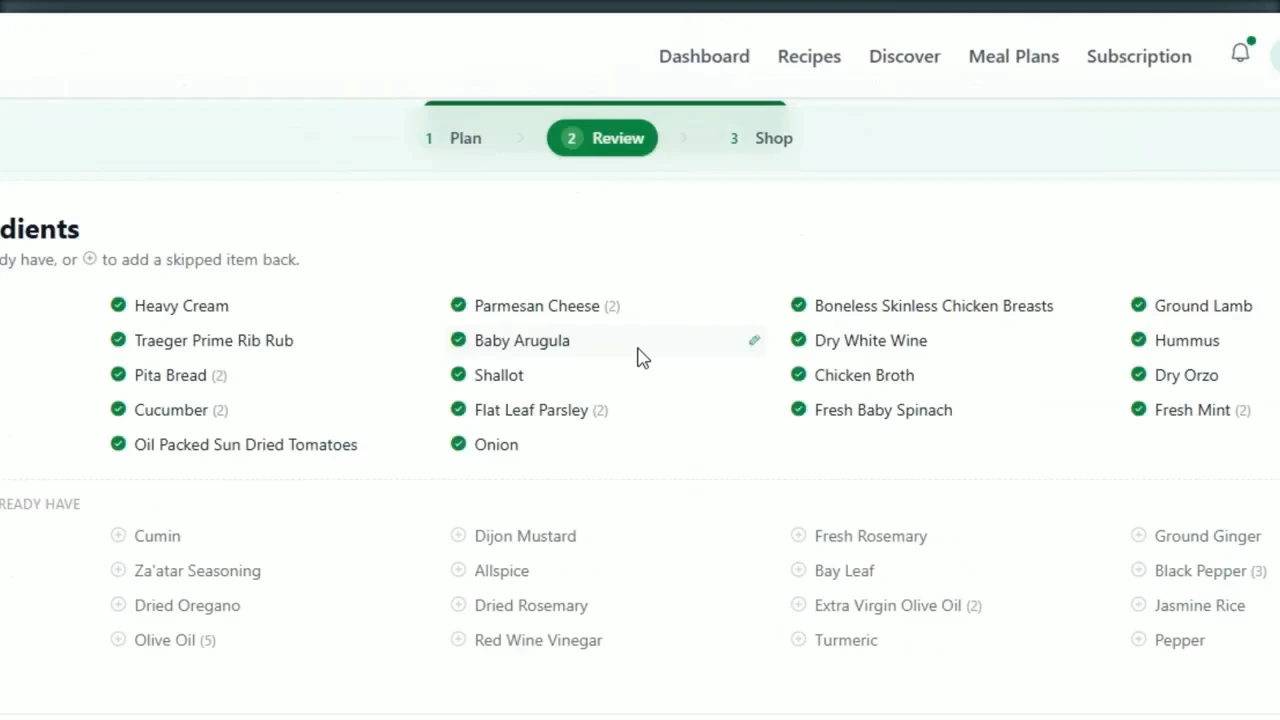
Pantry Aide gathers the recorded ingredients from the current plan, combines compatible repeated items, and produces one editable shopping list with just the items you need. You can change quantities, remove food already at home, restore a common staple you need, and add non-recipe household items.
When a meal changes, Pantry Aide re-syncs the recipe-derived list so ingredients from a discarded recipe are removed and ingredients from the current recipes are included. Review the revised list before shopping, particularly when two recipes use similar ingredients in different forms or units.
Choose the shopping handoff
From the reviewed list, you can create an Instacart shopping link using the items still selected. Open the link, inspect the resulting Instacart experience, and complete shopping and checkout there.
Pantry Aide Pro can instead search a selected Kroger store and prepare product matches. Review products, package sizes, and quantities; correct questionable matches; and explicitly confirm only when the proposed cart looks right. Final checkout remains with Kroger.
A practical own-recipes-to-cart workflow
-
1
Paste a supported recipe URL
Open the recipe URL import form, paste the source page URL, and import it. If the page is unsupported or extraction fails, enter the recipe manually instead.
-
2
Compare the saved recipe with its source
Check the source page against the saved title, servings, ingredients, quantities, and instructions. Correct missing or inaccurate details before adding the recipe to a plan. You can also explicitly save a public recipe to your collection.
-
3
Describe the week
Request the number of dinners you need and add schedule, preference, difficulty, or ingredient constraints.
-
4
Review and adjust the proposed meals
Open each recipe and replace, move, add, or remove meals before approving the week.
-
5
Reconcile one grocery list
Check combined ingredients, quantities, excluded staples, food already at home, and custom household additions.
-
6
Open Instacart or prepare Kroger
Create an Instacart shopping link, or inspect Kroger product matches and explicitly confirm the cart only after review.
Frequently asked questions
- Can I use my own recipes in Pantry Aide?
- Yes. You can enter recipes yourself or import supported recipe URLs. Recipes you own, plus public recipes you explicitly save, become part of the collection available to your meal plans.
- Will Pantry Aide plan only from recipes I personally entered?
- Standard planning uses the recipes available in your owned and saved collection. It does not promise that every proposed recipe was personally authored by you, so review each meal and keep only the recipes you want in the week.
- Can I import a recipe from a website?
- You can import supported recipe URLs and then review the resulting recipe fields. If a site cannot be imported cleanly, enter or correct the recipe manually before using it in a plan.
- Can I add a recipe from a photo?
- Photo recipe extraction is a Pantry Aide Pro feature. Review the extracted ingredients, quantities, yield, and instructions before planning or shopping.
- Does Pantry Aide create a grocery list from my recipes?
- Yes. Pantry Aide creates one editable list from the recipes in the current meal plan, combines compatible repeated ingredients, and keeps the recipe-derived list aligned when the plan changes.
- Does Pantry Aide know which groceries I already have?
- No. Pantry Aide does not maintain a live pantry inventory. Common staples may start unselected, but you should review the full list, restore anything you need, and remove anything already at home.
- Can I send the list to Instacart or Kroger?
- You can create an Instacart shopping link from selected list items. Pantry Aide Pro can prepare Kroger product matches, but you must review and explicitly confirm products and quantities before cart submission; final checkout remains with Kroger.