
Meal planning with Instacart
Instacart meal planning: plan dinners, review the list, shop.
Plan your week of dinners and get a grocery list with just the items you need. Review meals, quantities, and pantry staples, then open the selected items in Instacart. The shopping link is available free; product review and checkout happen in Instacart.
Updated October 8, 2026
An Instacart meal planner should finish the handoff
A meal calendar can settle what is for dinner and still leave you copying ingredients into another app. Pantry Aide keeps the approved recipes connected to the grocery list, then creates an Instacart shopping link from the items you selected to buy.
This is a plan-to-shopping workflow, not an automatic order. You decide which meals belong in the week, review the grocery list, open the generated link, and complete any product review and checkout in Instacart.
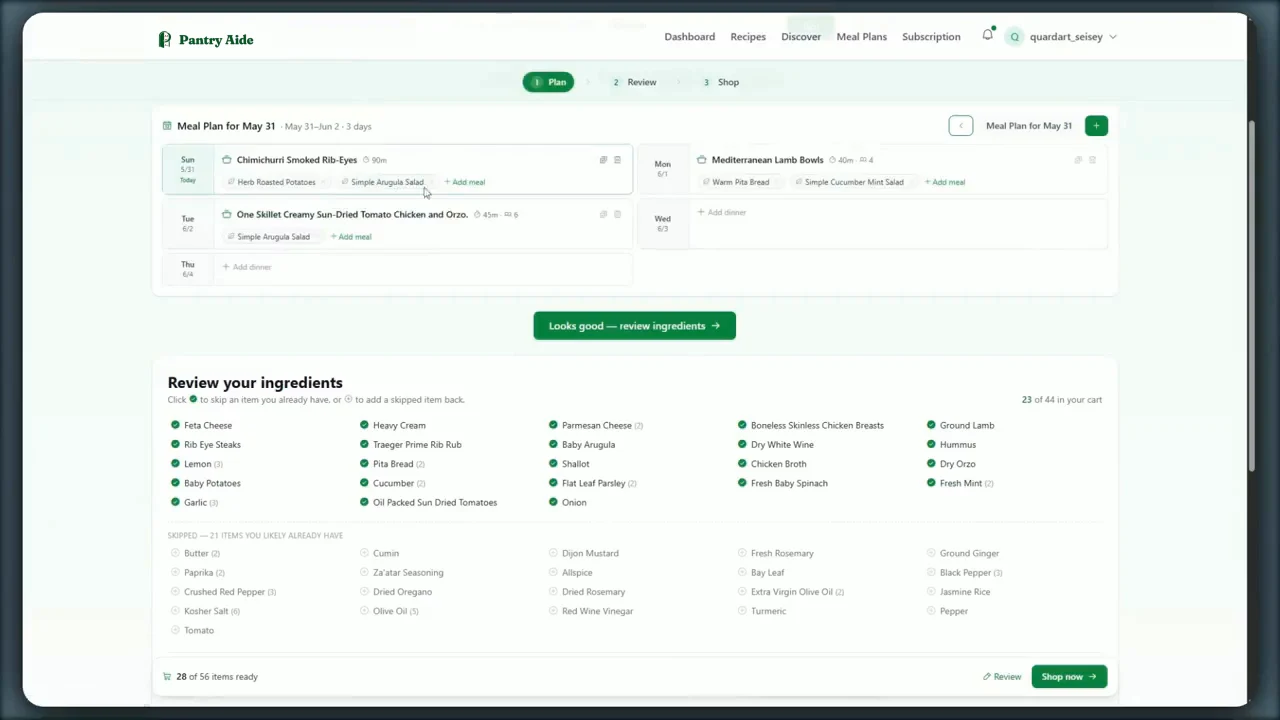
What goes into the Instacart link
Pantry Aide builds the shopping list from the recipes in the current meal plan. When ingredients overlap across meals, the list combines compatible items and quantities instead of treating every recipe line as a separate grocery.
Only selected shopping-list items are sent into the Instacart link. Before creating it, you can remove food you already have, restore a common staple you need, edit a quantity, or add a household item that did not come from a recipe.
- ✓Ingredients from every recipe in the reviewed plan.
- ✓Compatible duplicate items combined into a cleaner list.
- ✓Quantity and unit information carried from the shopping list.
- ✓Pantry-staple exclusions that remain reviewable rather than assumed correct.
- ✓Custom groceries kept alongside recipe-derived items.
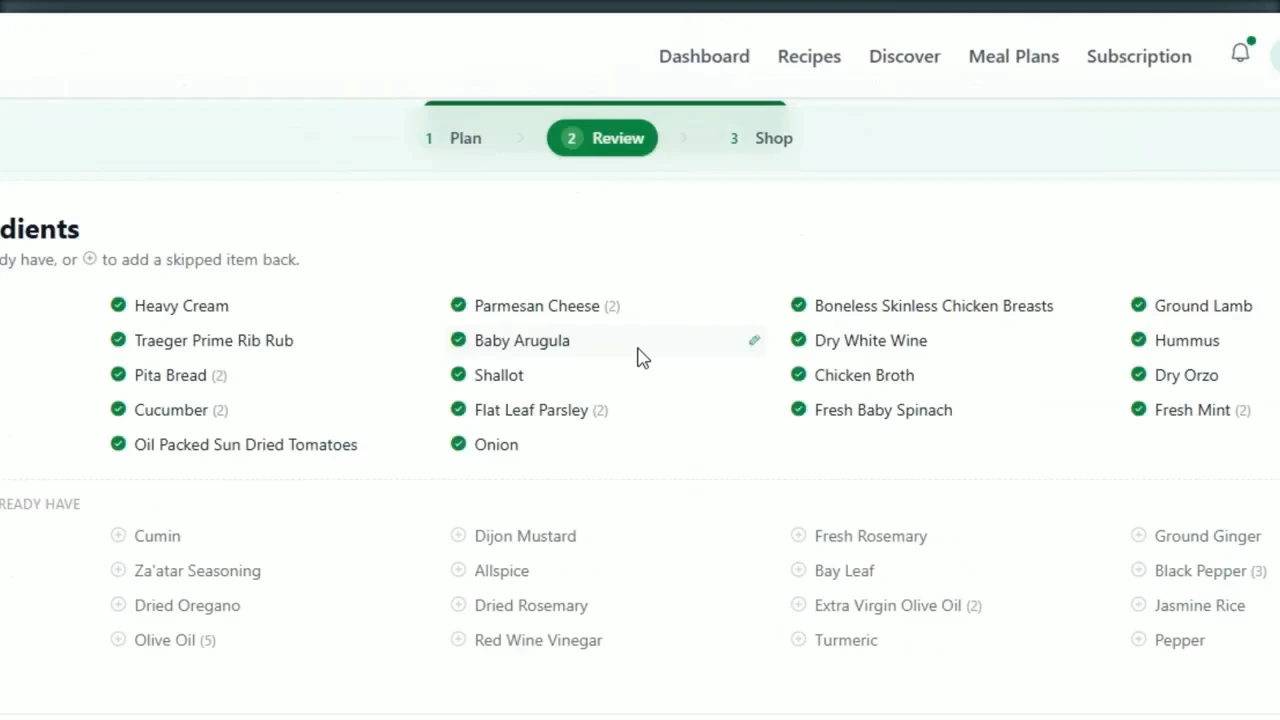
Review the week before you shop it
The most useful point to catch a bad meal choice is before buying its ingredients. Open the proposed recipes, replace or remove anything that does not fit, and confirm that the list reflects the final plan.
Meal-plan changes re-sync the recipe-derived shopping-list items. Check the revised quantities and selections again before opening Instacart, especially after replacing a dinner.
A practical meal-plan-to-Instacart workflow
-
1
Add or save recipes you can inspect
Bring in recipes from a URL, your notes, or your collection so the plan and its ingredient list have a concrete source.
-
2
Describe the week you need
Request the number of meals that fit your schedule and include relevant preferences, restrictions, or ingredients you want to use.
-
3
Review and adjust the meal plan
Inspect the recipes and replace, move, add, or remove meals before treating the week as approved.
-
4
Generate and reconcile one grocery list
Review selected groceries, excluded staples, combined quantities, and custom household items.
-
5
Create the Instacart shopping link
Pantry Aide generates a link from the selected list items. Open it, review the Instacart result, and finish shopping and checkout there.
Instacart on Free versus Kroger on Pro
Pantry Aide’s free plan includes two AI meal plans per calendar month, shopping lists, and Instacart links. You can test the complete meal-plan-to-Instacart handoff without subscribing.
Pantry Aide Pro adds the separate Kroger workflow. It searches a selected Kroger store and prepares product matches for review. Kroger products and quantities must be inspected and explicitly confirmed before cart submission, and final checkout remains with Kroger.
See how Pantry Aide creates one grocery list from the plan → Compare the reviewed Kroger-cart workflow → Compare Free and Pro shopping options →
Your week of dinners, planned and ready for Instacart
Start free with up to two AI meal plans per month, review the grocery list, and open an Instacart shopping link from the items you choose.
Frequently asked questions
- Does Pantry Aide work with Instacart?
- Yes. Pantry Aide can create an Instacart shopping link from the selected items on a reviewed grocery list.
- Can I turn a meal plan into an Instacart list?
- Yes. Pantry Aide builds one grocery list from the recipes in the current meal plan, combines compatible overlapping ingredients, and creates an Instacart link from the selected items.
- Does Pantry Aide automatically order from Instacart?
- No. Pantry Aide creates the shopping link. You open it, review the Instacart result, and complete shopping and checkout in Instacart.
- Can I remove pantry items before opening Instacart?
- Yes. Review both selected groceries and excluded common staples, restore anything you need, remove anything already on hand, and edit quantities before creating the link.
- What happens if I replace a meal?
- Pantry Aide re-syncs the recipe-derived shopping-list items so the list follows the current plan. Review the updated list before creating a new Instacart link.
- Is the Instacart link available on the free plan?
- Yes. The free plan includes shopping lists and Instacart links, plus up to two AI meal plans per calendar month.
- How is the Instacart workflow different from Kroger?
- Instacart uses a generated shopping link and is available on the free plan. Pantry Aide Pro can prepare product matches for a selected Kroger store; those matches require review and explicit confirmation before submission.